
librosa.filters.checkerboard_kernel#
- librosa.filters.checkerboard_kernel(n, *, window=None, var=0.5, norm=1, zero_mean=False, dtype=<class 'numpy.float32'>)[source]#
Build a 2-dimensional checkerboard filter kernel for novelty detection.
This kernel is primarily used for detecting structural transitions along the main diagonal of self-similarity and recurrence matrices (Foote’s method) [1].
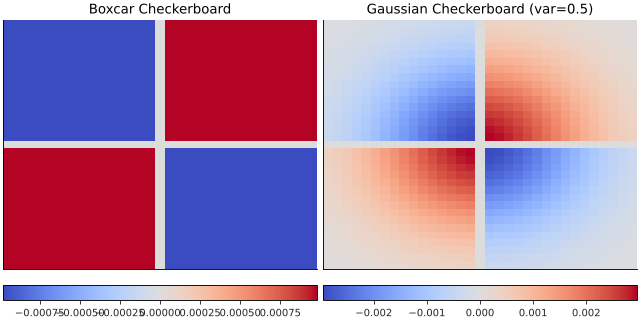
A checkerboard kernel has positive values on the main diagonal quadrants (representing coherent self-similarity within homogeneous sections) and negative values on the off-diagonal quadrants (representing anti-coherence or cross-similarity across section boundaries).
- Parameters:
- nint > 0
The length of the kernel along each dimension (produces an
(n, n)matrix).- windowstr, tuple, number, callable, list-like, or None, default=None
Window function for tapering the kernel:
None(default) or"ones"or"boxcar": classic box checkerboard without tapering."gaussian": Gaussian tapering with standard deviationvar * (n - 1) / 2, matching libfmp [2].Any other window specification supported by
get_window(e.g."hann",("kaiser", 4.0)).
- varfloat > 0, default=0.5
Variance parameter when
window="gaussian". Ignored for other windows.- normbool, float, or None, default=1
Normalization applied to the kernel:
1 or True: \(L_1\)-normalization (sum of absolute values equals 1).
float: \(L_p\)-normalization via
librosa.util.normalize.None or False: unnormalized.
- zero_meanbool, default=False
If True, subtract the mean so the kernel strictly sums to zero. (Note: symmetric checkerboard kernels with symmetric windows are already zero-mean).
- dtypenp.dtype, default=np.float32
Data type of the output kernel.
- Returns:
- kernelnp.ndarray, shape=(n, n)
The 2D checkerboard filter kernel.
Notes
This function caches at level 10.
References
Examples
Construct a boxcar checkerboard kernel (unwindowed):
>>> K_box = librosa.filters.checkerboard_kernel(33)
Construct a Gaussian-tapered checkerboard kernel:
>>> K_gauss = librosa.filters.checkerboard_kernel(33, window="gaussian", var=0.5)
Plot both kernels:
>>> import matplotlib.pyplot as plt
>>> fig, ax = plt.subplots(ncols=2, figsize=(8, 4), sharey=True)
>>> img0 = librosa.display.specshow(K_box, cmap="coolwarm", ax=ax[0])
>>> ax[0].set(title="Boxcar Checkerboard")
>>> fig.colorbar(img0, ax=ax[0], orientation="horizontal")
>>> img1 = librosa.display.specshow(K_gauss, cmap="coolwarm", ax=ax[1])
>>> ax[1].set(title="Gaussian Checkerboard (var=0.5)")
>>> fig.colorbar(img1, ax=ax[1], orientation="horizontal")