
librosa.effects.tremolo#
- librosa.effects.tremolo(y, *, sr, rate=5.0, depth=0.5, mode='sine', phase=0.0)[source]#
Apply tremolo (amplitude modulation) to an audio signal.
- Parameters:
- ynp.ndarray [shape=(…, n)]
Audio time series. Multi-channel is supported.
- srnumber > 0 [scalar]
Audio sampling rate of
y.- ratefloat > 0 [scalar]
Modulation frequency in Hertz (Hz). Defaults to 5.0 Hz.
- depthfloat in [0.0, 1.0]
Modulation depth controlling the severity of amplitude variation. At 0.0, no modulation occurs. At 1.0, maximum amplitude drops to zero.
- mode{‘sine’, ‘triangle’, ‘square’}
The LFO waveform type used for modulation: - ‘sine’ : Sinusoidal modulation - ‘triangle’ : Triangular modulation - ‘square’ : Square / pulse wave modulation
- phasefloat
Initial phase offset of the LFO in radians.
- Returns:
- y_tremolonp.ndarray [shape=(…, n)]
The amplitude-modulated audio time series.
See also
Examples
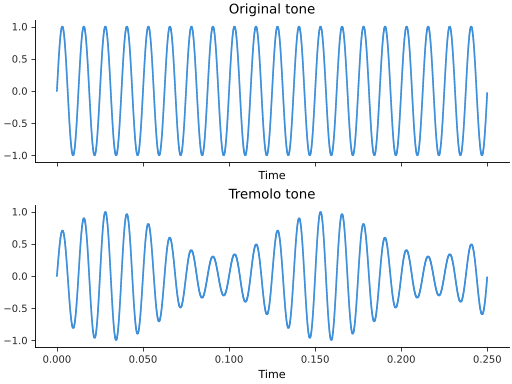
Apply tremolo to a pure tone and plot the waveforms before and after.
>>> import matplotlib.pyplot as plt
>>> sr = 22050
>>> y = librosa.tone(80, sr=sr, duration=0.25)
>>> y_trem = librosa.effects.tremolo(y, sr=sr, rate=8.0, depth=0.7)
>>> fig, ax = plt.subplots(nrows=2, sharex=True, sharey=True)
>>> librosa.display.waveshow(y, sr=sr, ax=ax[0])
>>> ax[0].set(title="Original tone")
>>> librosa.display.waveshow(y_trem, sr=sr, ax=ax[1])
>>> ax[1].set(title="Tremolo tone")