
librosa.feature.stack_memory#
- librosa.feature.stack_memory(data, *, n_steps=2, delay=1, **kwargs)[source]#
Short-term history embedding: concatenate an array with delayed copies of itself.
Each column
data[:, i]is mapped to:data[..., i] -> [data[..., i], data[..., i - delay], ... data[..., i - (n_steps-1)*delay]]
For columns
i < (n_steps - 1) * delay, the data will be padded. By default, the data is padded with zeros, but this behavior can be overridden by supplying additional keyword arguments which are passed to np.pad().- Parameters:
- datanp.ndarray [shape=(…, d, t)]
Input data matrix. If
datais a vector (data.ndim == 1), it will be interpreted as a row matrix and reshaped to(1, t).- n_stepsint > 0 [scalar]
embedding dimension, the number of steps back in time to stack
- delayint != 0 [scalar]
the number of columns to step.
Positive values embed from the past (previous columns).
Negative values embed from the future (subsequent columns).
- **kwargsadditional keyword arguments
Additional arguments to pass to
numpy.pad
- Returns:
- data_historynp.ndarray [shape=(…, m * d, t)]
data augmented with lagged copies of itself, where
m == n_steps - 1.
Notes
This function caches at level 40.
Examples
Keep two steps (current and previous)
>>> data = np.arange(-3, 3)
>>> librosa.feature.stack_memory(data)
array([[-3, -2, -1,  0,  1,  2],
       [ 0, -3, -2, -1,  0,  1]])
Or three steps
>>> librosa.feature.stack_memory(data, n_steps=3)
array([[-3, -2, -1,  0,  1,  2],
       [ 0, -3, -2, -1,  0,  1],
       [ 0,  0, -3, -2, -1,  0]])
Use reflection padding instead of zero-padding
>>> librosa.feature.stack_memory(data, n_steps=3, mode="reflect")
array([[-3, -2, -1,  0,  1,  2],
       [-2, -3, -2, -1,  0,  1],
       [-1, -2, -3, -2, -1,  0]])
Or pad with edge-values, and delay by 2
>>> librosa.feature.stack_memory(data, n_steps=3, delay=2, mode="edge")
array([[-3, -2, -1,  0,  1,  2],
       [-3, -3, -3, -2, -1,  0],
       [-3, -3, -3, -3, -3, -2]])
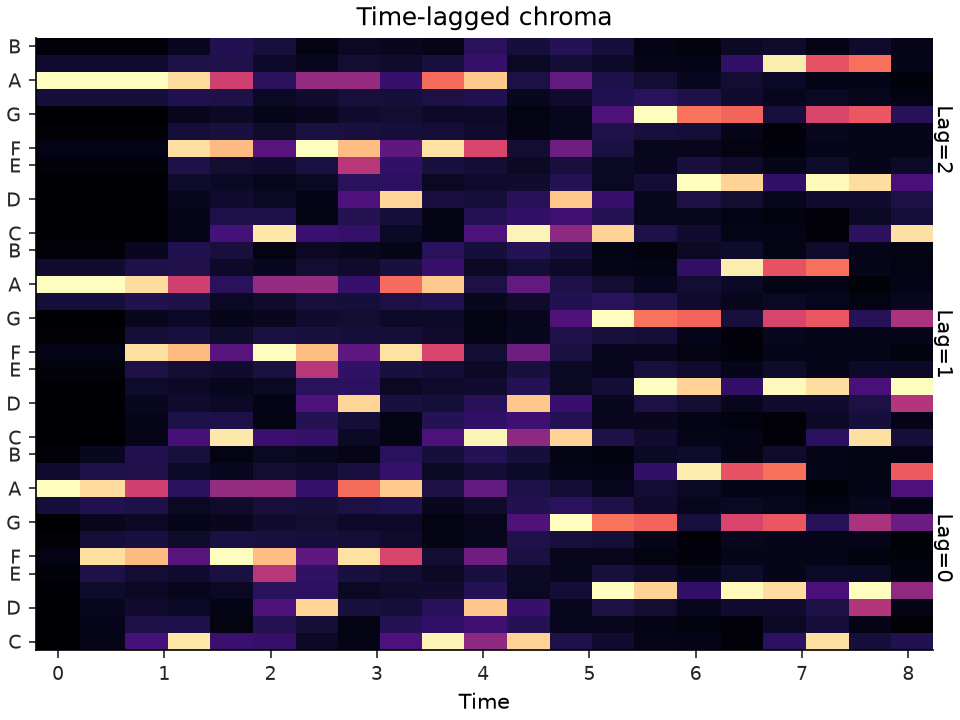
Stack time-lagged beat-synchronous chroma edge padding
>>> y, sr = librosa.loadx("sweetwaltz", duration=10)
>>> chroma = librosa.feature.chroma_cqt(y=y, sr=sr)
>>> tempo, beats = librosa.beat.beat_track(y=y, sr=sr, hop_length=512)
>>> beats = librosa.util.fix_frames(beats, x_min=0)
>>> chroma_sync = librosa.util.sync(chroma, beats)
>>> chroma_lag = librosa.feature.stack_memory(chroma_sync, n_steps=3, mode="edge")
Plot the result
>>> import matplotlib.pyplot as plt
>>> fig, ax = plt.subplots()
>>> beat_times = librosa.frames_to_time(beats, sr=sr, hop_length=512)
>>> librosa.display.specshow(
...     chroma_lag, y_axis="chroma", x_axis="time", x_coords=beat_times, ax=ax
... )
>>> ax.text(
...     1.0,
...     1 / 6,
...     "Lag=0",
...     transform=ax.transAxes,
...     rotation=-90,
...     ha="left",
...     va="center",
... )
>>> ax.text(
...     1.0,
...     3 / 6,
...     "Lag=1",
...     transform=ax.transAxes,
...     rotation=-90,
...     ha="left",
...     va="center",
... )
>>> ax.text(
...     1.0,
...     5 / 6,
...     "Lag=2",
...     transform=ax.transAxes,
...     rotation=-90,
...     ha="left",
...     va="center",
... )
>>> ax.set(title="Time-lagged chroma", ylabel="")